 Pick
PickVersion 1.0 · 10 October 2026
Connect your Selfly fridges in 4 steps
About 10 minutes. You need your Selfly Cloud login.
What we require
- 1Organisation nameYou find it in Selfly Cloud
- 2The code of each fridgeYou find it in Selfly Cloud
- 3API accessSelfly sends it after one email: client ID and secret, API user and password, access key
Step 4 is where you enter them. Nothing is sent to us by email.
1
Write down your organisation name
Log in to cloud.selflystore.com. It is in the top right box.

2
Write down each fridge’s code
Device Management › your fridge › Control Panel › Refill QR Code
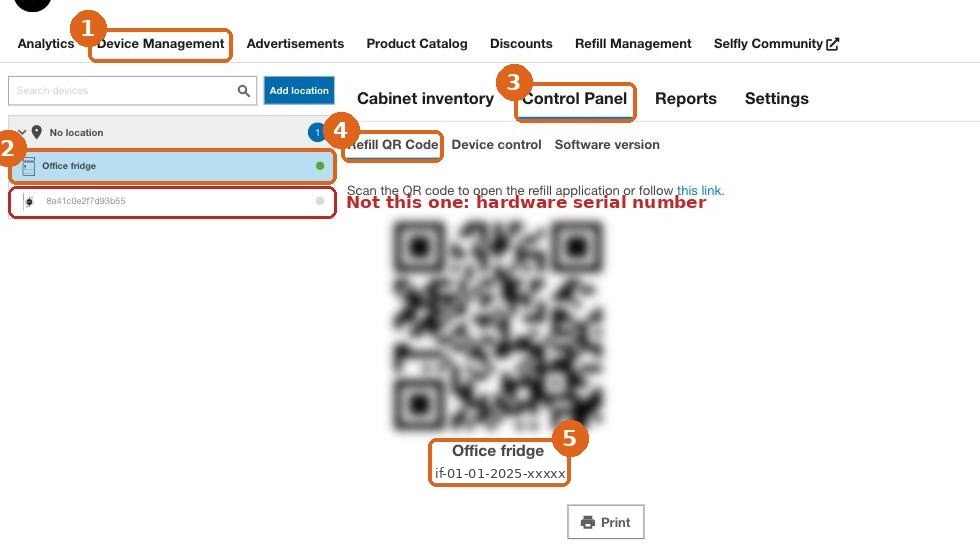
The code starts with if-. Not the long number on the left.
3
Ask Selfly for API access
Copy this email, add your organisation name and fridge codes, send.
To: support@selflystore.com
Subject: API access for PickVend

Hi Selfly team,

Please enable API access for our organisation, so we can connect our fridges to delivery apps through PickVend (pickvend.com). We need the client ID and secret, an API user that can read stock and open the door, and the application access key on our fridges.

Organisation: [from step 1]
Fridge codes: [from step 2]

Thank you,
[your name]
4
When Selfly replies, paste it in your PickVend portal
Open your portal link, paste everything, press Test connection. Green means done.
Never email passwords to anyone, including us.
Stuck? Email hello@pickvend.com with a screenshot.