 Pick
PickVersion 1.0 · 10 October 2026
Connect your Vending on Track machines in 4 steps
About 10 minutes. You need your Vending on Track login.
What we require
- 1The ID of each machineYou find it in Vending on Track
- 2Connectivity Platform loginVending on Track sends it after one email: username and password
- 3One machine settingYour technician checks it: multi-selection off
Step 4 is where you enter them. Nothing is sent to us by email.
Copy each machine’s ID
Log in to app.vendingontrack.com, open Vending Machines and click your machine.
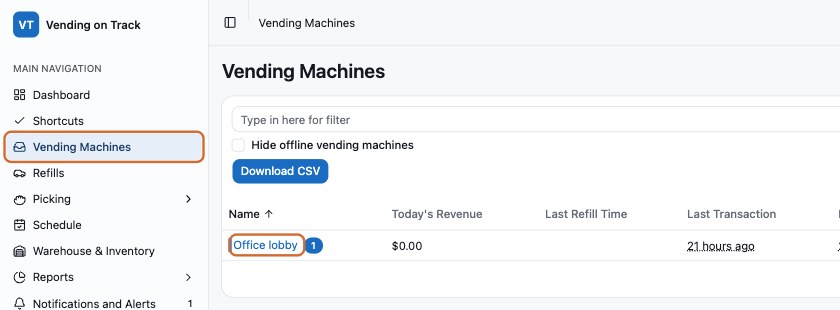
The ID is the long code at the end of the address bar.
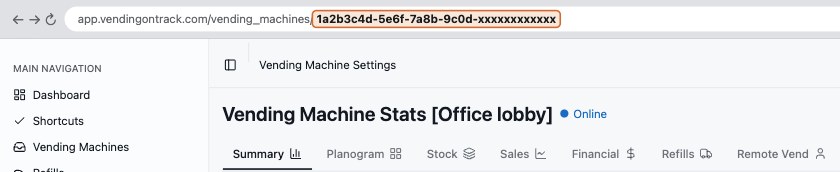
It looks like 1a2b3c4d-5e6f-… (36 characters). Not the machine name.
Ask Vending on Track for Connectivity Platform access
Copy this email, add your company and machine names, send.
To: support@vendingontrack.com
Subject: Connectivity Platform access for PickVend

Hi,

Please enable Connectivity Platform access for PickVend (pickvend.com) on our account, so we can sell from our machines on delivery apps. Please send us the username and password.

Account: [your company]
Machines: [machine names from step 1]

Thank you,
[your name]
Check one machine setting
Ask your technician to switch off multi-selection (multi-vend, combined vend), so each item is paid separately.
The courier presses the item numbers on the keypad. We approve only the items in the order.
When Vending on Track replies, paste it in your PickVend portal
Open your portal link, paste the username, password and machine IDs, press Test connection. Green means done.
Never email passwords to anyone, including us.
Stuck? Email hello@pickvend.com with a screenshot.